Standalone
D-matte Standalone
The application on its own.
2,000EGP
- Rotoscoping with SAM 3 and SAM 2.1
- MatAnyone 2, ViTMatte and VideoMaMa
- Node graph, brush and wipe
- EXR, ProRes 4444, PNG, TIFF, H.264
 D-matte
AI rotoscoping for video. Type what you want cut out, get a clean alpha channel for your compositor.
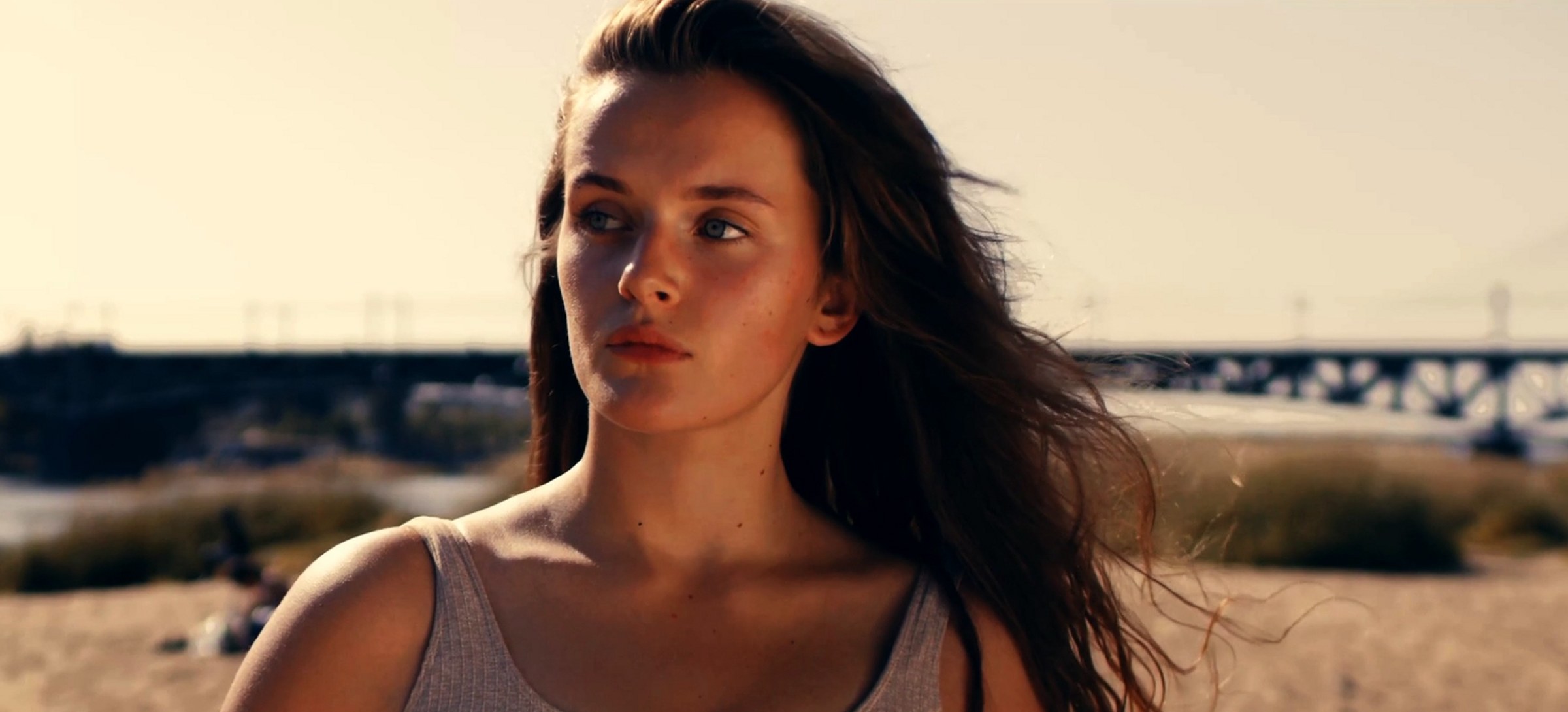
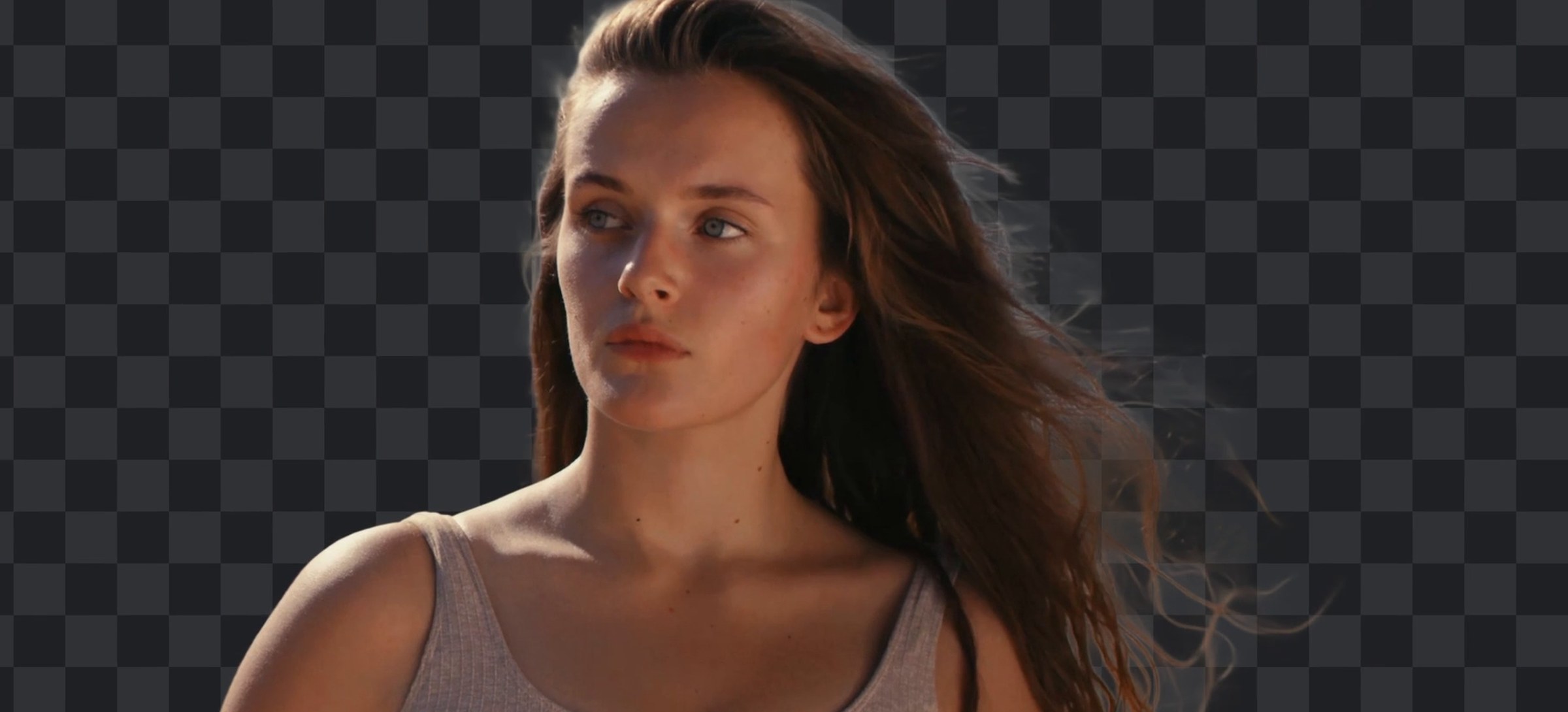
D-matte Standalone is a Windows desktop application by DAVX, made by Hossam Galal. You point at the subject, or just describe it, and the tool tracks it through the whole shot and turns the rough mask into a soft alpha matte. It all runs on your own NVIDIA card: no upload, no cloud, no waiting in a queue.
D-matte for Nuke is one node inside Nuke 15, by DAVX, made by Hossam Galal. Connect your footage, draw a box or type what you want, and the node tracks it through the shot and refines it into a soft alpha, right in your script. It all runs on your own NVIDIA card: no upload, no cloud, no round trip.
D-matte All-in-One is the application and the Nuke node together, by DAVX, made by Hossam Galal. You point at the subject, or just describe it, and the tool tracks it through the whole shot, turns the rough mask into a soft alpha matte, and can even paint the subject out of the plate. It all runs on your own NVIDIA card: no upload, no cloud, no waiting in a queue.
SAM 3 takes a sentence. "person" on a four-dancer shot gives four separate tracked mattes with no clicks at all. SAM 2.1 is still there when you want to point at one specific thing.
Hard masks are refined into soft alpha with hair, motion blur and glass intact. Levels, gamma, feather, choke and despill finish the edge without a round trip to another app.
D-matte fills in the background where the subject was, steady across frames instead of flickering. Long clips are split into overlapping windows, so a thousand frames run on the same card as a hundred.
EXR half-float sequences from frame 1001, ProRes 4444 with alpha, PNG or TIFF sequences, or H.264 for review. One file per object, named after the object. Send to Nuke is built in.
The matte comes out of the node like any other Nuke output: overlay, matte only, premultiplied or straight. No export, no import, no second app.
Video or image sequence, up to 4K. The tool reads the container and warns about limited range, a non-BT.709 tag or variable frame rate.
Type what you want, or click to include and right-click to exclude. Every match becomes its own object.
The mask follows the subject through the shot. Press T. Cancel any time and the frames already done are kept.
Pick a matting model and turn the mask into soft alpha. Press M. Fix it with the brush where the model is wrong.
Choose a format and send it to disk, or straight into Nuke. Press Ctrl+E. What you approved on screen is what lands on disk.
Nodes ▸ D-matte, or Tab and type it. Connect your footage, unpremultiplied RGB is best.
Draw a box or points on the Viewer with SAM 2.1, or type a word like person with SAM 3.
Press ROTO / TRACK SAM. The matte follows the subject forward and back from the reference frame.
Pick MatAnyone 2, ViTMatte or VideoMaMa and press REFINE MATTE for a soft edge.
Overlay, matte only, premultiplied or straight, or turn the matte into editable Roto shapes.
Each model declares what it accepts (points, text or a box) and the panel shows only the matching controls. Weights live in one shared folder that other tools can read, and missing models are reported, never downloaded behind your back.
| Model | Job |
|---|---|
| SAM 3 | Text prompt, tracks every match as its own object |
| SAM 2.1 Large | Click-based tracking of one specific thing |
| SAM 2.1 Base+ / Small | Box or point tracking of one specific thing |
| ViTMatte | Matting: fastest |
| MatAnyone 2 | Matting: steady, light on memory |
| VideoMaMa | Matting: finest edge and least flicker, slowest |
| Object removal | Fills the background where the subject was |
| Model | FPS | VRAM | Edge detail | Flicker (lower is steadier) |
|---|---|---|---|---|
| ViTMatte | 1.67 | 5.29 GB | 44,996 px | 19.5 / 255 |
| MatAnyone 2 | 1.39 | 6.01 GB | 33,835 px | 22.6 / 255 |
| VideoMaMa | 0.49 | 5.64 GB | 47,407 px | 16.6 / 255 |
VideoMaMa is the steadiest and finest, and more than three times slower. ViTMatte beats MatAnyone on every axis measured here.
Paint into the mask, or straight into the soft matte. Left-drag adds, right-drag erases. Size with [ ].
Sweeping across the edge you are judging beats reaching for a slider and looking away from it. The same wipe as the before / after above.
Prompts, strokes and finished runs share a single undo stack. Click any entry to roll back. A stroke stores only the rectangle it touched, so undo costs kilobytes, not a copy of a 4K mask.
A view is a stage (source, masks, mattes, removal) crossed with an output (overlay, matte, alpha, over colour). The exporter uses the same code, so what you see is what you get.
See what you loaded and what it costs. Disk usage separates what can be rebuilt for free (frames) from what cost model time (masks and mattes).
Each clip gets its own folder, so opening a second shot never destroys the first one's masks. Reopening a clip you have already loaded is instant.
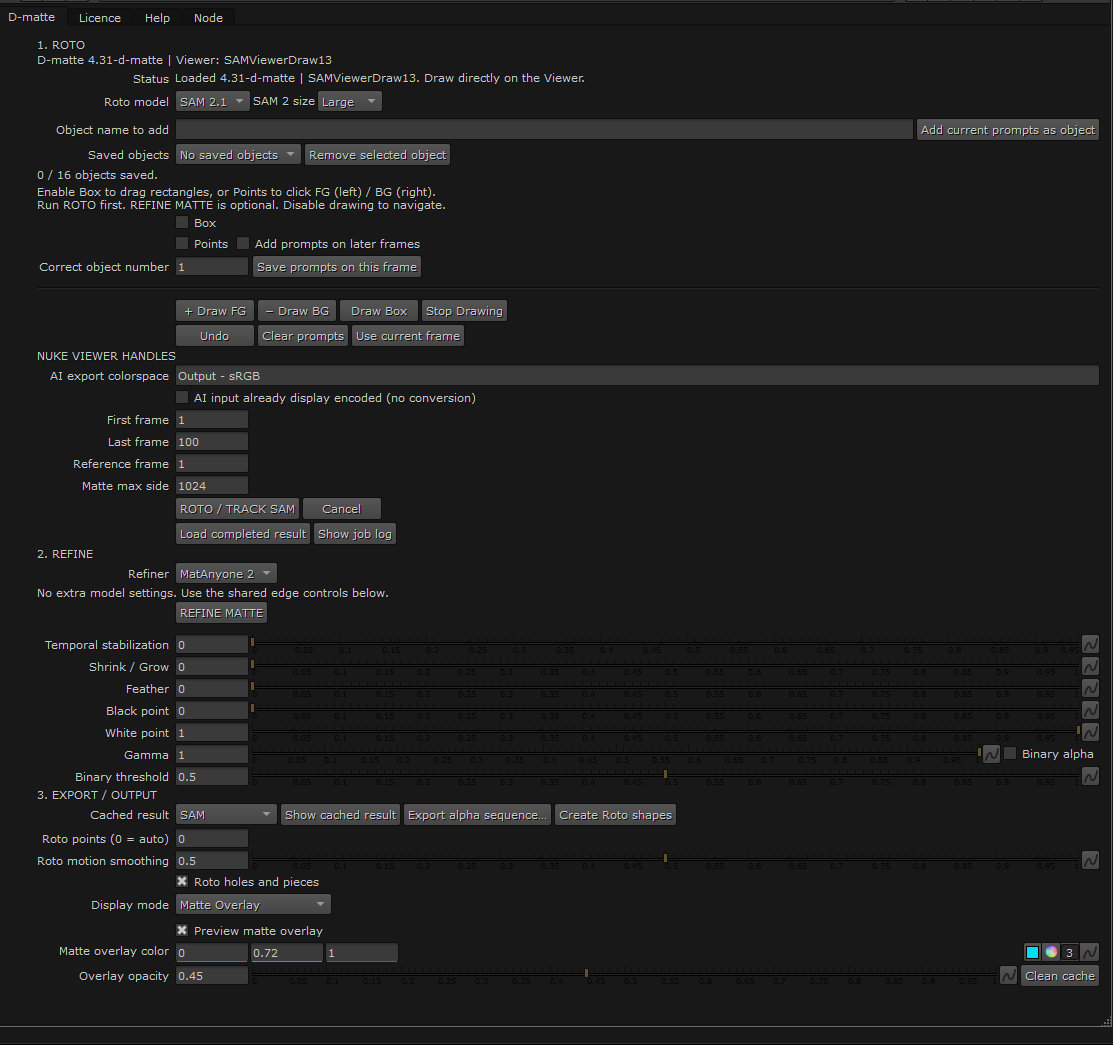
Name each box before you draw it. Every object gets its own colour and its own matte, and Object Colors Overlay shows them all over the plate.
Add prompts on later frames for a fast move or an occlusion, save the correction, and track again.
Seed tracking with a mask you already have, refine a connected matte directly, or add, subtract or intersect another mask after the run.
Create Roto shapes builds a normal Roto node: one Bezier per object, keyed on every frame, ready to edit by hand.
Matte Overlay, Object Colors Overlay, Matte Only, RGB*A premultiplied and RGB+A straight.
A Help tab with the steps, every setting, what to do when it goes wrong, and the steps in Arabic.
Half-float sequence, numbered from 1001.
Movie file with a real alpha channel.
Image sequences, with or without alpha.
Small review copy to send for approval.
Put the shot beside its matte, or in a folder you pick, ready to open.
Complete and verified end to end on an RTX 3060 Ti with 8 GB. Every slow job runs on a worker thread, so the window never freezes. GPU jobs run one at a time, so two models never fight over the card.
| Stage | 1080p | 3840×2160 |
|---|---|---|
| SAM 3 propagation | ~1.0 fps · 1.7 GB | ~0.6 fps |
| SAM 2 tracking | ~4.8 fps | ~2.0 fps |
| MatAnyone 2 | ~2.6 fps @ 720 | ~1.6 fps @ 1080 |
| Object removal | ~0.34 fps · 6.0 GB | — |
A 110-frame 4K shot takes roughly three minutes to track with SAM 3, or one minute with SAM 2 points. You need Windows and an NVIDIA GPU with 8 GB or more.
Space play · ← → step · I O in / outP point · B brush · W wipeT track · M matte · R remove · Ctrl+E export1–8 presets · F fit · \ isolate objectCtrl+Z / Ctrl+Y undo and redo · Esc cancel the running jobSend us a clip you want to test, and we will send back its matte.
Install it, use everything for 7 days free, and buy a licence only if it earns its place on your machine.
The application on its own.
The D-matte node inside Nuke 15.
The application and the Nuke node.
Windows 10 / 11, 64-bit · no admin rights needed · 7 days free, no sign-up · a licence opens one machine
AI models are not included: you download each from its authors, under its own licence.
Windows 10 or 11 (64-bit) and an NVIDIA graphics card with 8 GB of VRAM or more. There is no Mac or Linux version yet.
The first run downloads PyTorch and the AI libraries once, about 3.4 GB. Updates after that are small. Download only the models you use from Help ▸ Models.
Install a newer Setup over the old one. Your licence, PyTorch and models are kept, and the app tells you when a new version is out.
After the first-run download, no internet connection is needed to keep working.
The trial starts on first launch, with no sign-up. Everything works during the trial except Send to Nuke, ViTMatte and VideoMaMa. The days left show in the status bar.
In the app: Help ▸ Buy / Licence, then Copy machine code.
Paste it into an email or a LinkedIn message. We reply with the price and how to pay.
Paste the licence we send and press Activate. Everything unlocks at once.
A licence is signed for your machine's code and is refused anywhere else. It needs no internet to keep working.
| What you get | Standalone 2,000 EGP | for Nuke 2,000 EGP | All-in-One 3,000 EGP |
|---|---|---|---|
| Tracking: SAM 3 (text) and SAM 2.1 (points) | ✓ | ✓ | ✓ |
| MatAnyone 2, ViTMatte and VideoMaMa edge matting | ✓ | ✓ | ✓ |
| The D-matte node inside Nuke | – | ✓ | ✓ |
| The application, with its node graph and viewer | ✓ | – | ✓ |
| Object removal | – | – | ✓ |
| All export formats (EXR, ProRes 4444, PNG, TIFF, H.264...) | ✓ | – | ✓ |
| Send to Nuke | – | – | ✓ |
The first release.
Node graph with several shots in one project. SAM 3 text prompts and SAM 2.1 points. Three matting models, object removal, brush, wipe and one history for every edit.
Eight export formats, five output types, and Send to Nuke: one click renders the matte and puts the nodes on the clipboard.
Dark and light themes that switch at once, five workspace layouts, a start window with recent files, and a models window that downloads only what you use.
A 7-day trial with no sign-up, a licence tied to one machine, and an update notice that never locks anything.
You need an NVIDIA card with 8 GB of VRAM or more. D-matte was tested end to end on an RTX 3060 Ti with 8 GB.
Not yet. It is Windows 10 / 11 (64-bit) and NVIDIA only.
No. Everything runs on your machine. After the first-run download, it works without an internet connection.
A 110-frame 4K shot takes roughly three minutes to track with SAM 3, or about one minute with SAM 2 points. Matting is slower: ViTMatte ran at about 1.7 fps on a 4K frame, VideoMaMa at about 0.5 fps.
ProRes 4444 with alpha, ProRes 422 HQ, H.264, H.265, FFV1, and PNG, TIFF and OpenEXR (half float) sequences. You can export the matte, a cut-out, the cut-out over a colour, the source plate, or the plate with the object removed.
The app asks for a licence. Your projects stay where they are, and they open again as soon as you activate.
In the app, open Help ▸ Buy / Licence and copy the machine code. Send it to us, paste back the licence we reply with, and press Activate.
A licence opens one machine only. To move it, or to go from one edition to All-in-One, write to us and we will sort it out.
Only for the first-run download of PyTorch and the AI libraries (about 3.4 GB), for the models you choose to download, and for the update notice.
No. D-matte does not include any model. Each model is made by its own authors and comes with its own licence, and D-matte downloads it from the authors' own page only when you choose it. Some of these licences allow non-commercial use only, MatAnyone 2 and the object-removal model among them. Read each model's licence and decide for yourself whether your use is allowed: that choice and its responsibility are yours. What you buy is the D-matte software.
Start the 7-day trial on your own footage. If a shot is hard, tell us about it and we will say honestly whether D-matte is a good fit.
A few seconds of a person with loose hair can cost a roto artist a day or more. D-matte does the first 90% with AI in minutes, and leaves you in control of the rest. It is made by DAVX, a post-production studio, for compositors, and it runs on your own machine.
DAVX is a post-production studio: VFX, compositing, colour grading and editing. D-matte started inside its own pipeline, built around how shots really go: long takes, tight deadlines and one GPU. Now it is available to other studios and artists.
Hossam is a compositing supervisor who built D-matte from scratch to take the slowest job in the pipeline off the compositing desk, and answers every email and message personally.
Everything runs on your GPU. No upload, no cloud queue, no account. After the first-run download it works offline.
D-matte is checked end to end on commercial and film footage, not on demo clips, with the speeds and VRAM published instead of promised.
Every slow job runs in the background, cancelling keeps the frames already done, and one history rolls back anything.
A brush, a wipe and soft-edge controls are there for the frames where the AI is wrong, because there always are some.
Questions, a licence, an order for several machines, or a shot you want to test? Write to us.